Gingerbread Man 3D Paper Ornament for Festive Fun
Looking for a fun and creative way to add holiday cheer? The Gingerbread Man 3D Paper Ornament is the perfect solution. This festive design brings traditional charm into modern crafting, allowing you to create a charming decoration that’s both eye-catching and easy to make. Whether you're an experienced crafter or just starting out, this ornament is a delightful project that can be customized and used in many ways.
A Classic Twist on Holiday Decor
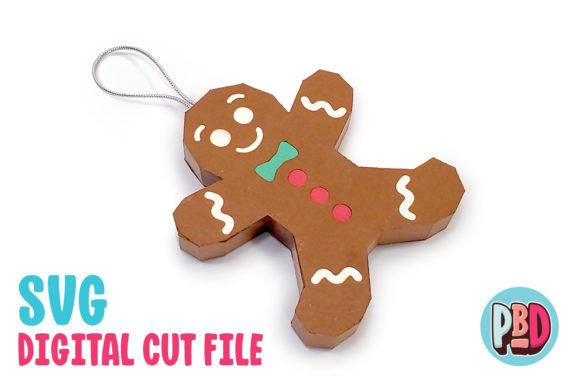
The Gingerbread Man is a beloved symbol of the winter season, often seen in cookies, stories, and decorations. By transforming it into a 3D paper ornament, you get to enjoy its whimsical appeal while also showcasing your crafting skills. Measuring 3 inches wide by 4 inches tall with a depth of 0.5 inches, this ornament is sized perfectly to hang on a tree, string up as part of a garland, or use as a unique gift tag.
Why Choose This Design?
There are several reasons why the Gingerbread Man 3D Paper Ornament stands out:
- Simple Assembly: The design uses medium cardstock, which is sturdy yet easy to cut and fold. With clear step-by-step instructions included in the downloadable PDF, even beginners can complete the project quickly.
- Customization Options: Once assembled, the ornament provides opportunities for personal touches like glitter, paint, or added textures. These small details can make each piece feel special and tailored to your taste or event theme.
- Versatile Use: Beyond being a Christmas tree decoration, this ornament works well at holiday parties, classroom events, or as part of seasonal displays in retail or home decor settings.
What's Included in the Download
The Gingerbread Man 3D Paper Ornament download package includes everything you need to start creating right away:
- SVG Cut File: Ideal for users of Silhouette Designer Edition and above or Cricut Design Space. SVG files offer cleaner lines and faster processing, making them a top choice when possible.
- DXF Cut File: Designed for Silhouette Basic Edition users. While DXF files may take longer to load and aren’t as sharp as SVGs, they’re still fully functional if preferences are set correctly.
- PDF Instructions: A detailed guide that walks you through cutting, assembling, and texturing your ornament. Perfect for those who prefer a physical reference or want to print and follow along hands-free.
All files are contained within a single ZIP folder. Before using any of the cut files, remember to extract the contents from the ZIP file first. This ensures all components are accessible and ready for use.
Setting Up Your Software Correctly
If you're using the DXF file with Silhouette Studio, it's important to adjust your settings for optimal results. Follow these steps to ensure the file loads properly:
- Open Silhouette Studio.
- Navigate to Edit > Preferences > Import DXF > Open.
- Change the import setting from “As-is” to “Centered.”
This adjustment helps position the design accurately on your mat. Note that DXF files tend to open more slowly than SVGs and may not have the same level of detail. If your software supports SVG files, it’s best to use those for smoother operation and sharper cuts.
Beginner-Friendly Tips for Success
Even if you've never worked with digital cut files before, the Gingerbread Man 3D Paper Ornament is a great place to start. Here are some tips to help you achieve the best results:
- Use Quality Cardstock: Medium-weight cardstock (around 80–110 lb) is recommended because it holds shape well without tearing during assembly.
- Test Your Machine Settings: Make sure your cutter is calibrated for the thickness of the cardstock you're using. A test cut on a scrap piece can save time and materials later.
- Follow the Folding Lines Carefully: The ornament relies on precise folds to maintain its 3D structure. Take your time and use a bone folder or ruler to press creases firmly.
- Experiment with Textures: The instructions include helpful texturing tips, such as scoring certain areas before folding or using embossing tools to mimic the look of real gingerbread.
Realistic Use Cases and Creative Ideas
This ornament isn't just for hanging on trees. Think about how you can incorporate it into different aspects of your holidays:
- Holiday Parties: String multiple ornaments together to make a festive banner or use them as table centerpieces.
- Gift Tags: Add a small loop and attach it to a gift box or bag. Personalize with names or messages for a handmade touch.
- Classroom Activities: Teachers can use the Gingerbread Man 3D Paper Ornament as a fun holiday craft for students, combining art and holiday traditions.
- Business Branding: Small businesses can customize the design with their logo or branding elements and give them as promotional items or part of store decorations.
- Bloggers and Marketers: Create themed content around the ornament—tutorial videos, DIY blogs, or social media posts—to engage audiences with seasonal, interactive projects.
Important Considerations Before Starting
Before diving into your Gingerbread Man 3D Paper Ornament project, there are a few things to keep in mind to avoid common pitfalls:
- Software Compatibility: Ensure your machine and software support either SVG or DXF files. While the design works with Silhouette and Cricut platforms, other software has not been tested.
- Time Management: Although the design is beginner-friendly, it does require attention to detail. Set aside enough time to go through the steps carefully.
- Storage and Display: Once made, consider how you’ll store or display the ornaments. They are delicate and may need extra care if kept for future use.
Getting Started Is Easy
Creating the Gingerbread Man 3D Paper Ornament is a straightforward process. After downloading and extracting the ZIP file, choose the file format compatible with your cutting machine. Load the design, select your preferred cardstock, and begin cutting. Then, follow the printed instructions to assemble each piece and bring your 3D creation to life.
One of the most exciting parts is the ability to add texture and visual interest. For example, you could lightly sand the edges to simulate a weathered look or use metallic foil for a shiny finish. These enhancements don’t require advanced techniques but can significantly elevate the final product.
Enhancing the Design with Personal Touches
While the base design is charming on its own, adding your own flair can make it truly one-of-a-kind. Some popular customization ideas include:
- Paint Details: Use acrylic paints or markers to color the hat, buttons, or facial features.
- Add Glitter or Sequins: Apply adhesive-backed glitter or glue on sequins to highlight key areas like the eyes or shoes.
- Incorporate Real Cookies: For a whimsical twist, attach a real gingerbread cookie to the front using strong glue or double-sided tape.
- Write a Message: Include a handwritten note or label with holiday greetings inside the ornament for a personalized gift.
These additions are optional but can help reflect your personality or match the theme of your space or event. The beauty of this project lies in its flexibility—there’s no one right way to decorate it!
Perfect for Seasonal Events and More
Beyond Christmas, the Gingerbread Man 3D Paper Ornament can be adapted for other seasonal celebrations. For instance, change the colors slightly for New Year’s Eve or add themed accessories for Hanukkah or Kwanzaa. Its classic silhouette makes it adaptable and timeless, ensuring it can become a staple in your annual holiday routine.
For educators or community leaders, this ornament can serve as a centerpiece for a holiday-themed workshop or activity. It encourages creativity, fine motor skills, and teamwork, especially when working with groups. Plus, it’s a great conversation starter that connects people through shared traditions.
Where to Find Inspiration and Supplies
Want to see what others have done with the Gingerbread Man 3D Paper Ornament? Check out online crafting communities like Pinterest, Instagram, or Facebook groups dedicated to holiday DIYs. You’ll find countless examples of how to personalize the design and even combine it with other festive elements like snowflakes or candy canes.
As for supplies, most craft stores carry the necessary materials, including cardstock, cutting mats, and adhesives. If you're new to digital crafting, now is a great time to invest in a basic cutting machine like Silhouette or Cricut, which will open up a world of creative possibilities beyond just this ornament.
Final Thoughts
The Gingerbread Man 3D Paper Ornament is more than just a holiday decoration—it’s a joyful way to express creativity, share traditions, and build something meaningful. Whether you’re looking to spruce up your home, host a themed party, or simply try your hand at digital crafting, this project offers a rewarding experience for all skill levels.
With its charming design, practical dimensions, and customizable nature, it’s easy to see why this ornament is a favorite among hobbyists, educators, and entrepreneurs alike. Just remember to check your software settings and use quality materials for the best outcome. Happy crafting! 🎄✨