Coconut 3D Papercraft: A Creative Addition to Your Projects
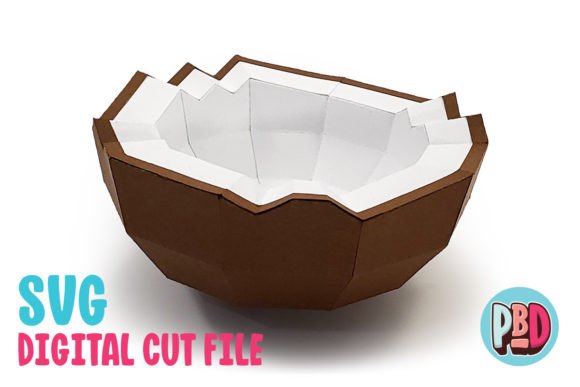
Coconut 3D papercraft is a versatile and eye-catching design that brings a tropical, handmade touch to any space or event. Whether you're decorating for a beach-themed party, adding whimsy to your home, or creating unique centerpieces for events, this papercraft offers a charming way to elevate your décor with minimal effort. Measuring 5 inches wide by 5 inches deep and 3 inches high, it’s compact yet impactful—perfect for both small and large displays.
Why Choose Coconut 3D Papercraft?
This design is ideal for anyone looking to add texture, color, and creativity to their projects without the need for complex tools or advanced skills. It's crafted to be assembled from medium cardstock, which makes it sturdy enough to stand on its own while still being easy to cut and fold. The included SVG and DXF cut files ensure compatibility with popular crafting machines like Silhouette and Cricut, making it accessible to both hobbyists and professionals alike.
Beyond its aesthetic appeal, the Coconut 3D papercraft is also functional. It can serve as:
- A decorative accent for holiday or summer parties
- An educational tool for teaching geometry or art in classrooms
- A branded item for businesses hosting themed events or giveaways
- A creative gift idea for friends who love DIY crafts
Common Mistakes When Using Coconut 3D Papercraft
Despite its simplicity, there are several common mistakes users make when working with Coconut 3D papercraft that can affect the final outcome. Here are some of them and how to avoid them:
1. Choosing the Wrong Material Thickness
One of the most overlooked aspects is selecting the right type of paper. The design is optimized for medium cardstock (around 100–140 gsm), but using something too thin or too thick can lead to issues. Thin paper may not hold its shape well and could tear during assembly. Conversely, overly thick materials might cause problems with scoring and folding, especially if you’re using a manual scorer.
Tip: Always double-check the material recommendations in the instructions before printing or cutting. If you don’t have access to a cardstock thickness gauge, test with a sample piece first to ensure clean folds and durability.
2. Ignoring Software Compatibility Notes
When downloading the ZIP file containing the SVG and DXF cut files, it's crucial to understand which software works best with each format. The SVG file is compatible with Silhouette Designer Edition and above, as well as Cricut Design Space. The DXF file, however, is only suitable for Silhouette Basic Edition and requires specific preference settings to load properly.
If you try to use the DXF file without adjusting the preferences in Silhouette Studio, you might end up with misaligned parts or incomplete cuts. This can lead to wasted time and materials, especially if you're working under a deadline.
Solution: Before opening the DXF file, go to Edit > Preferences > Import DXF > Open, and change the setting from “As-is” to “Centered.” This ensures the design loads correctly and aligns for accurate cutting.
3. Not Following the Instructions Step-by-Step
Many crafters rush through the assembly process, thinking it's just another simple project. However, Coconut 3D papercraft relies on precise folding and gluing to maintain its structure and visual appeal. Skipping steps or not following the order can result in a lopsided or unstable model.
Pro Tip: Print out the PDF instructions and place them near your workspace. Go step-by-step, ensuring each tab is folded correctly and glued securely. Taking your time will pay off in a more professional-looking finished product.
Optimize for Your Machine
While the DXF file is available for those using Silhouette Basic Edition, it's important to note that SVG files generally provide cleaner lines and faster processing. If you're using a Silhouette machine and have access to the Designer Edition or higher, always prioritize the SVG file for better accuracy and performance.
DXF files can sometimes take longer to open and may require more memory from your machine. If you notice lag or poor rendering, consider upgrading your software or using SVG instead.
Customize for Different Occasions
The beauty of Coconut 3D papercraft lies in its adaptability. You can easily customize it to suit different themes and purposes:
- Party Decor: Paint or print the coconut in bright colors to match your event’s palette. Add a ribbon or string for hanging as a festive decoration.
- Home Accents: Place it on a shelf or table as part of a tropical-inspired vignette. Pair it with other papercraft elements like palm trees or seashells for a cohesive look.
- Marketing Tool: For businesses, consider incorporating logos or brand colors into the design. These custom pieces can serve as memorable takeaways at pop-up shops or community events.
Storage and Reuse Considerations
If you're planning to reuse your Coconut 3D papercraft across multiple events, proper storage is essential. Leaving it in a humid environment or stacking it with other items without support can cause warping or collapse.
Best Practice: Store completed models flat in a box or hang them carefully using a looped string to preserve their shape. If you're keeping the cut pieces for future assembly, store them in a labeled folder to keep everything organized.
What to Check Before Starting Your Project
To ensure success with your Coconut 3D papercraft, follow these quick checks before beginning:
- Verify File Format Compatibility: Make sure your cutting software supports the file types you plan to use. Refer to the notes provided with the download to avoid software-related errors.
- Review Material List: The instructions include a full list of recommended materials. Confirm that you have all necessary supplies, including cardstock, scissors, glue, and a ruler.
- Test a Small Section First: Especially if you're new to papercrafting, try assembling one flap or panel before committing to the whole model. This helps catch any potential issues early on.
- Check Printer Settings: Ensure your printer is set to scale the design to 100% to maintain accurate dimensions. Printing at an incorrect size can throw off the entire build.
Realistic Examples and Better Approaches
Let’s say you’re preparing decorations for a summer wedding. You decide to use Coconut 3D papercraft as part of your venue setup. If you choose to print on glossy photo paper instead of medium cardstock, the model may appear shiny but won't hold up well outdoors or when handled. Instead, opt for weather-resistant cardstock or apply a light coat of sealant after assembly for added durability.
Another example involves educators using papercraft in the classroom. A teacher might want to create a diorama with coconuts as part of a geography lesson. By assembling the Coconut 3D papercraft correctly and placing it alongside printed maps or student-made sandcastles, they can create a visually engaging learning environment that reinforces the theme effectively.
For entrepreneurs, offering customized versions of the Coconut 3D papercraft as promotional items can be a hit. One business owner used it at a tropical-themed wellness retreat, printing each coconut with the retreat logo and a motivational message. The result was a unique keepsake that guests loved and shared online, increasing visibility and word-of-mouth promotion.
Conclusion
Coconut 3D papercraft is a delightful and practical addition to your creative toolkit. Its compact size and adaptable design make it perfect for a range of uses—from party décor to educational aids. But like any craft, it demands attention to detail and preparation to achieve the best results.
By choosing the correct materials, verifying software settings, and following instructions carefully, you can avoid common pitfalls and enjoy a smooth crafting experience. Whether you're a beginner exploring papercraft for the first time or a seasoned creator looking for fresh ideas, this design offers a fun and rewarding challenge.
So, before you dive into your next project, take a moment to review the details. With the right approach, your Coconut 3D papercraft will stand out in quality and presentation, leaving a lasting impression wherever it appears.