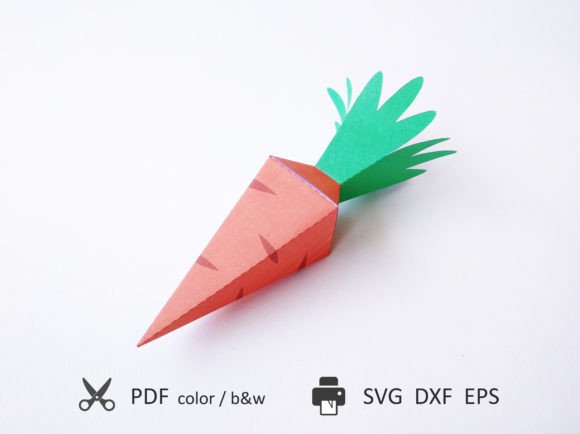
Carrot 3D Template for Paper Crafting: A Creative and Practical Guide
The Carrot 3D Template for Paper Crafting is a versatile digital resource that brings joy to both hobbyists and professionals in the world of papercraft. Designed specifically for creating intricate and charming paper toys, these templates offer an easy-to-use solution for those who want to build something unique without needing advanced artistic skills. Whether you're crafting a gift box or assembling a cute CARROTPaper toy, this template set provides everything you need to create a stunning three-dimensional model with just a few simple steps.
Understanding the File Formats Included
One of the key advantages of the Carrot 3D Template is its compatibility with multiple file formats, making it accessible to users of various tools and preferences. The package includes:
- PDF files – Ideal for hand-cutting using standard A4 Letter size paper.
- SVG, DXF, EPS files – Perfect for use with cutting machines like Cricut or Silhouette. These vector-based files allow for precise cuts and folds.
Each file type serves a different purpose. For example, if you're working manually, the PDF gives you clear outlines and instructions on how to cut, fold, and glue each piece. If you're using a digital cutting machine, SVG, DXF, and EPS files can be imported directly into your software, streamlining the process and ensuring accuracy.
Cutting Machine Compatibility and Scoring Options
For users of automated cutting machines, the Carrot 3D Template offers two distinct sets of machine-ready files:
- With Scoring Tool: These files are optimized for machines equipped with a scoring feature. The score lines help you make clean, crisp folds, which are essential for maintaining the structural integrity and aesthetic appeal of your final product.
- Without Scoring Tool: This version includes perforated fold lines instead. While slightly different from scored lines, they still guide you effectively when folding by hand or using alternative methods.
It's important to note that layers within the SVG, DXF, and EPS files are color-coded. This helps ensure that each component of the toy is separated and easy to identify before importing them into your cutting software. If your machine supports multi-layer cutting, you can customize settings for each layer to match your project needs.
Instructions and Tips for Beginners
Inside the ZIP file, you'll find an info file with detailed instructions. This guide is crucial for beginners as it walks you through the entire assembly process, from downloading and extracting the files to selecting the right format for your tools. It also explains how to properly scale the design if you wish to create a larger version of the toy.
If you're new to using a cutting machine, take time to understand how to differentiate between cutting lines and scoring/perforation lines. Most modern software allows you to assign specific tools (like a blade or scorer) to each line type. Ensuring that the correct tool is used for each layer will significantly improve the quality of your finished model.
Dimensions and Scaling Possibilities
The assembled CARROTPaper toy measures approximately 6.9 x 2 x 2 inches (175 x 50 x 50 mm), making it compact yet detailed enough to impress. This size is ideal for small gifts, decorations, or even as part of a diorama or themed display.
However, the beauty of the Carrot 3D Template lies in its flexibility. You're not limited to the original size. The template can be easily scaled in your cutting software to fit larger paper sizes such as Tabloid or A3. When printed at this larger scale, the toy becomes about 1.5 times bigger, allowing for more robust models that are great for showcasing or using in educational settings.
Scaling the template maintains the proportions and ensures that all elements remain balanced and visually appealing. Just remember to adjust the thickness of the lines if necessary—some machines may require slight tweaks to accommodate larger dimensions without losing detail.
Manual vs. Machine Cutting: Which Is Right for You?
Deciding whether to cut by hand or with a machine depends largely on your available tools and personal preference. Both methods have their merits and can produce excellent results.
For manual crafting enthusiasts, the PDF template for A4/Letter paper is perfect. It provides a clear layout with color-coded outlines and fold lines, helping you navigate the construction process step by step. Using a ruler, craft knife, and scoring tool manually can give you greater control over the final outcome and is a satisfying hands-on experience.
If you prefer efficiency and precision, using a cutting machine with SVG, DXF, or EPS files is the way to go. Simply import the chosen file into your software, set up the layers correctly, and let the machine do the hard work. This method is especially beneficial when making multiple copies of the same toy, such as for gifts or classroom projects.
Regardless of the method you choose, always ensure your workspace is well-lit and organized. A clutter-free area makes it easier to manage the delicate pieces and follow the instructions accurately.
Choosing the Right Materials
While the templates are designed for standard A4/Letter paper, experimenting with different materials can enhance the visual and tactile experience of your CARROTPaper toy. Consider using:
- Cardstock for sturdier builds
- Colored paper for added visual flair
- Glossy or matte finishes for varied aesthetics
- Paperboard for a more durable gift box
Keep in mind that heavier papers might require stronger adhesives or adjustments to your cutting machine’s pressure settings. Always test a small section before committing to the full project, especially when using non-standard materials.
Applications and Use Cases
The Carrot 3D Template isn't just for fun—it has practical applications too. Here are some common ways people use these templates:
- Gift Boxes: Create custom boxes for birthdays, holidays, or special occasions. Personalize them with colors or add small embellishments to match the theme of the gift.
- Educational Projects: Teachers often use these templates in classrooms to teach geometry, spatial awareness, and fine motor skills. Students enjoy the interactive nature of building a 3D object from flat paper.
- Decorations: From party favors to home décor, these toys can be displayed as standalone art or integrated into other creative projects like shadow boxes or photo frames.
- Business Promotional Items: Custom-printed versions of the CARROTPaper toy can serve as memorable promotional items or packaging inserts for products.
Thanks to its modular design, the Carrot 3D Template fits seamlessly into many creative workflows. Whether you're preparing for a large-scale production or just making one for yourself, the process remains intuitive and rewarding.
Why Choose the Carrot 3D Template?
There are several reasons why the Carrot 3D Template for Paper Crafting stands out among similar resources:
- User-Friendly Design: The layout is clear and concise, making it easy to follow even for first-time users.
- Multi-Format Support: With options for both hand and machine cutting, it adapts to your preferred method of creation.
- Customization Potential: The ability to scale and modify the design allows for endless creativity.
- High-Quality Output: When built correctly, the final product looks professional and polished.
These qualities make the template suitable for a wide range of audiences—from kids looking for a fun weekend activity to artists and designers seeking inspiration for their next project.
Common Questions and Considerations
Before starting your project, it's helpful to address some common concerns that arise when working with papercraft templates:
- Do I Need Special Tools? While a cutting machine enhances the experience, you can complete the project with just a pair of scissors, a craft knife, and some glue. The PDF format is designed for ease of hand-cutting.
- How Long Will It Take? Assembly time varies depending on complexity, but most models take anywhere from 30 minutes to an hour to complete once all pieces are cut.
- Can I Print Multiple Times? Yes! Each template is designed for repeatable printing. Just ensure your printer settings are consistent for accurate alignment of parts.
- What If I Make a Mistake? Don’t worry—mistakes happen. The modular nature of the template means individual components can be replaced or re-cut without starting over.
By addressing these questions beforehand, you’ll feel more confident in your approach and reduce the chances of frustration during the crafting process.
Getting Started with Your Carrot 3D Project
Here’s a quick step-by-step overview to get you started:
- Download the ZIP file and extract its contents.
- Choose the appropriate file format based on your cutting method.
- Print the template onto your selected paper stock.
- Use a cutting machine or hand tools to separate the pieces.
- Score or fold along the indicated lines for clean creases.
- Assemble using adhesive of your choice, following the provided instructions.
This straightforward workflow makes it easy to dive into your project with minimal preparation. And since the Carrot 3D Template is designed for clarity and simplicity, even complex models become manageable.
Integrating Into Modern Workflows
In today’s fast-paced digital world, the Carrot 3D Template for Paper Crafting blends traditional craftsmanship with modern technology. Many creators now combine digital tools like Adobe Illustrator or Inkscape with physical crafting techniques to produce high-quality designs quickly.
For businesses, these templates can be a valuable asset in branding efforts. By incorporating company logos or messages into the paper toy, you can create engaging marketing materials or packaging solutions that stand out. Artists can also use these templates as a foundation for mixed-media projects or as part of a larger installation.
Additionally, the Carrot 3D Template is compatible with online platforms where you can share your creations or sell custom versions. Whether you're a content creator, educator, or entrepreneur, this resource opens up a world of possibilities for integrating papercraft into your daily activities.
Final Thoughts on Creativity and Craftsmanship
The Carrot 3D Template for Paper Crafting is more than just a collection of digital files—it’s a gateway to creativity and hands-on learning. Its combination of accessibility, scalability, and versatility makes it a favorite among DIY enthusiasts, educators, and designers alike.
By offering both hand-cut and machine-cut options, the template accommodates a broad range of skill levels and interests. Whether you're building a gift box for a loved one or creating a batch of CARROTPaper toys for resale, the process is enjoyable and fulfilling.
So, the next time you're looking for a fun and meaningful project, consider giving the Carrot 3D Template a try. It's a perfect blend of art and engineering, designed to bring smiles and satisfaction with every fold and glue stroke.